Dify's RAG accuracy is low? How to build a high-accuracy chatbot yourself with GenSpark and Gemini [With Code]
Table of Contents
- 1. Are you feeling the limits of Dify's RAG accuracy?
- 2. The "Three Walls" Faced in Dify's Knowledge Base Construction
- 3. Solution: GenSpark Knowledge × Gemini Long Context
- 4. Implementation Code Explanation: Cloudflare Workers + Hono
- 5. Tips for Prompt Design to Define the Bot's Personality
- 6. Summary: AI Development for the Right Place at the Right Time
1. Are you feeling the limits of Dify's RAG accuracy?
"Why do corporate website chatbots give so many irrelevant answers?"
When I tried to introduce a "GenSpark" support bot to a community app I developed myself, I encountered this question. "'If it's just about linking to an FAQ, search is fine.' 'That's not what I want to know.' To avoid such user experiences, I decided to build "a chatbot with truly satisfactory accuracy" myself.
2. The "Three Walls" Faced in Dify's Knowledge Base Construction
Initially, I built a RAG (Retrieval-Augmented Generation) system using the popular low-code development tool "Dify." It has a convenient feature that imports blog articles and automatically vectorizes them.
However, after 3 days of tuning, the following problems remained unresolved:
- Information Fragmentation: Only parts of articles are retrieved, and context is ignored.
- Hallucination: It gets pulled by similar words and fabricates information based on irrelevant articles.
- Repeated "I don't know": If the search score threshold is increased, it stops answering anything.
Here, I formulated a hypothesis: "The RAG mechanism itself, which relies on retrieval, might not be suitable for this scale."
3. Solution: GenSpark Knowledge × Gemini Long Context
So, I switched the approach from "retrieval" to "full reading." It consists of the following three steps:
- GenSpark (Data Generation): Have AI read blog articles and generate a "perfect Q&A list."
- Cloudflare Workers (Execution Environment): Save the generated knowledge to KV and expose it as an API.
- Gemini 1.5 Flash (Brain): Include the full knowledge in the prompt and have it answer.
4. Implementation Code Explanation: Cloudflare Workers + Hono
Here's an excerpt of the backend code I assembled in 2 hours. I'm using the lightweight Hono framework.
Core Logic: Full Knowledge Transfer and NO_ANSWER Control
The key points of this code are passing the knowledge obtained from KV directly to Gemini, and controlling the bot to prevent it from saying arbitrary things.
import { Hono } from 'hono'
import { cors } from 'hono/cors'

const app = new Hono()
app.use('/*', cors())

// Main reply endpoint
app.post('/api/reply', async (c) => {
  try {
    const body = await c.req.json()
    const { content } = body // User's post content

    // 1. Get all text from the knowledge base (KV)
    // No RAG (search), load everything here
    const knowledge = await c.env.KV.get('kb:all', 'text')

    if (!knowledge) {
      return c.json({ error: 'Knowledge base error' }, 500)
    }

    // 2. Generate answer with Gemini API
    const answer = await generateAnswer(content, knowledge, c.env.GEMINI_API_KEY)

    // 3. Ignore if the question is outside the knowledge base (Important!)
    // To avoid being community noise, don't answer what you don't know
    if (answer === 'NO_ANSWER' || answer.trim() === 'NO_ANSWER') {
      console.log('[BOT] Skipping because it's outside the knowledge base')
      return c.json({
        status: 'no_answer',
        message: 'No relevant information'
      })
    }

    // ... (Continued to post processing)

    return c.json({ status: 'success', answer })

  } catch (error) {
    return c.json({ error: error.message }, 500)
  }
})

export default app
Actual Operation Screen
Below is a glimpse of the bot actually operating in the community app. A user asks about "Thinking loop," and the bot answers appropriately.
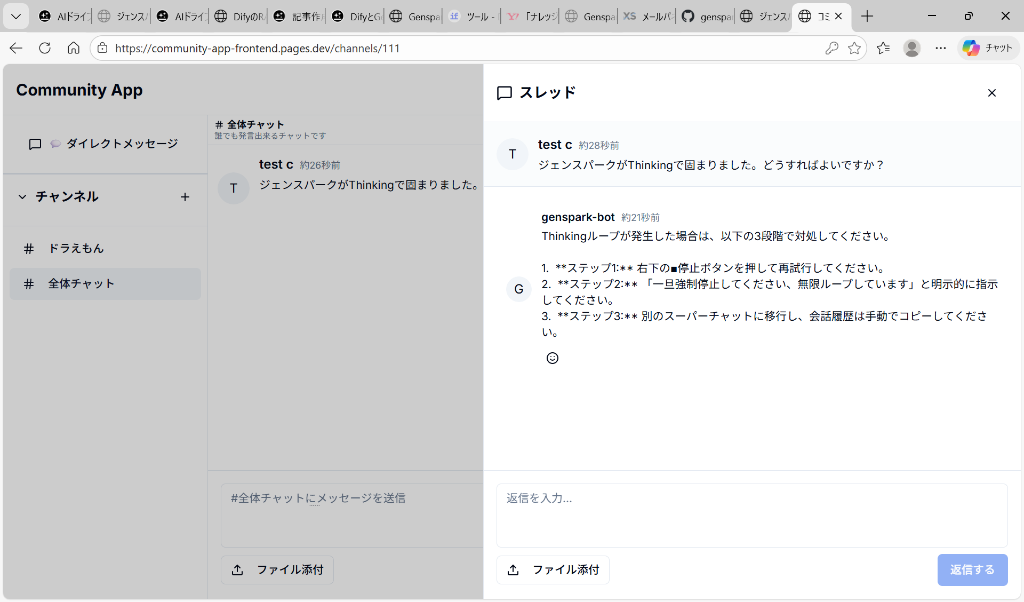
Figure: GenSpark bot responding to a user's question
As you can see from this screen, the bot accurately extracts and answers the specific solution "if a Thinking loop occurs" from the knowledge base. This "accurate response with contextual understanding," which was difficult with Dify's RAG, has now been achieved.
5. Tips for Prompt Design to Define the Bot's Personality
The prompt (instruction manual) given to Gemini is also important. It not only answers but also controls "the behavior as a community bot."
async function generateAnswer(question, knowledge, apiKey) {
  const prompt = `You are a support bot for the Genspark community.

[Important Rules]
1. Use only the information described in the knowledge base below.
2. If there is no relevant information in the knowledge base, return only "NO_ANSWER."
3. Do not apologize for defects (you are a volunteer tool, not official).
4. Minimize greetings and preambles, answer with the conclusion first.
5. Do not engage in small talk and return "NO_ANSWER."

Knowledge Base:
${knowledge}

User's Question: ${question}

Answer:`

  // ... (Gemini API call processing)
}The instruction "no apologies" is particularly effective. AI tends to quickly say "We apologize for any inconvenience," but if an unofficial bot does this, users get confused. This control made it a very "useful" bot.
6. Summary: AI Development for the Right Place at the Right Time
Development that took 3 days struggling with Dify was completed in just 2 hours by simply changing the configuration. Even after deployment, the "misaligned answers" I disliked have not occurred a single time.
If you are currently exhausted by building RAG with Dify or LangChain, or by its low accuracy, take a moment to consider: "Can't current AI models read all of that document?"
Organize with GenSpark, read with Gemini. This simple configuration might be the strongest solution for individual development.