Your First Genspark: How to Use the Multifunctional AI Tool You'll Want to Try After ChatGPT
📋 Table of Contents
1. Introduction
Genspark Arrives in Japan
▲ Genspark TV Commercial (Official YouTube)
In 2026, Genspark made its full-scale entry into the Japanese market. Many of you have probably seen the name "Genspark" in TV commercials or train ads, haven't you?
"I'm curious about that tool I saw in the commercial!"
"I know ChatGPT, but what is Genspark?"
"I saw it in a commercial, but what kind of tool is it?"
"How is it different from ChatGPT?"
For those with such questions, this article explains everything from Genspark's basic functions to how to use it, in an easy-to-understand way for ChatGPT users.
💡 By the way...
"Genspark" is a new service, so its name is not yet widely known. Some people search on Google for "原図パーク" (Genzu Park), "j'sパーク" (J's Park), or "ゲンズパーク" (Genzu Park), but the correct name is "Genspark".
2. What is Genspark?
Official Name: Genspark
Operating Company: Genspark Inc.
Service Start: 2024 (Full-scale entry into Japan: 2026)
Official Website: https://www.genspark.ai/
Genspark is a multifunctional AI tool that offers the ease of use of ChatGPT, while providing all the features necessary for business, such as "slide creation," "image generation," "video creation," and "meeting minute creation."
⚠️ Genspark is not just a "chat AI"
Genspark is a multifunctional AI business tool. It can complete all necessary business document creation, such as presentation materials, image assets, video content, and meeting minutes, all within a single tool.
Differences from ChatGPT, Claude, and Gemini
ChatGPT, Claude, Gemini, etc., are like "excellent secretaries."
They are good at conversation and text generation, but on their own, they cannot create slides, generate images, or create videos.
On the other hand, Genspark is like a "secretary's office."
By equipping the secretary (AI) with various tools such as "slide creation tools," "image generation tools," and "video creation tools,"
tasks that could not be completed with ChatGPT can now be completed simply by giving instructions.
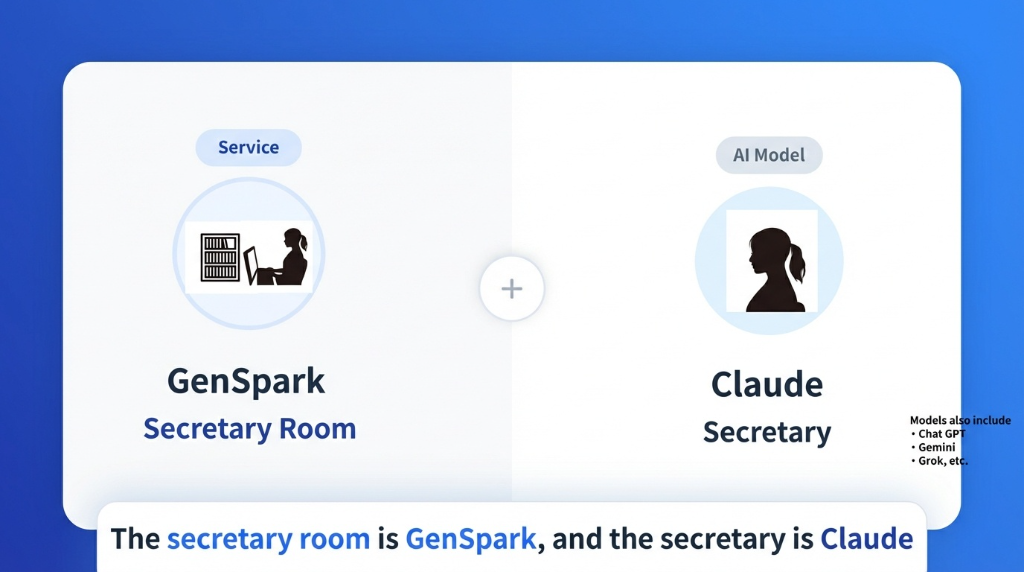
Genspark is a "secretary's office" equipped with various tools
✅ For example, you can do these things with just instructions (not possible with ChatGPT)
- "Create a presentation document with this content" → PowerPoint slides are completed
- "Create an image for product introduction" → Image is generated
- "Summarize the meeting minutes" → Meeting minutes are automatically created
- "Turn this document into a video" → Video content is created
→ With ChatGPT, these tasks cannot be "completed with just instructions."
With Genspark, everything is completed within a single tool.
💡 What is the AI model "Claude"?
Claude is a high-performance AI model developed by Anthropic. Genspark allows you to select and use multiple AI models, including Claude (ChatGPT, Gemini, Grok, etc.).
3. Differences Between ChatGPT and Genspark
For you, a ChatGPT user, the most interesting point will be "How is it different from ChatGPT?" The comparison table below clarifies the differences between the two tools.
| Feature | ChatGPT | Genspark |
|---|---|---|
| Chat / Text Generation | ✅ | ✅ |
| Slide Creation | ❌ | ✅ (Completed with just instructions) |
| Image Generation | Paid (DALL-E) | ✅ (Free tier available) |
| Video Generation | ❌ | ✅ |
| Meeting Minute Creation | ✅ (Text only) | ✅ (Automated formatting and saving) |
| Office Integration | ❌ | ✅ (Excel, Word, PowerPoint, PDF) |
| File Storage | ❌ | ✅ (AI Drive) |
| Program Development | Code generation only | ✅ (Development + Testing + Execution) |
| Free Plan | Limited usage | 100 credits per day |
⚠️ Key Point: ChatGPT = Chat-focused, Genspark = Multifunctional Business Tool
While ChatGPT specializes in "chat and text generation," Genspark's biggest feature is that it "can do a lot of things."
4. Main Features of Genspark
Genspark's multifunctionality is explained in four categories.
💡 For detailed feature explanations, see here
For more detailed information about all Genspark features, please see the following articles.
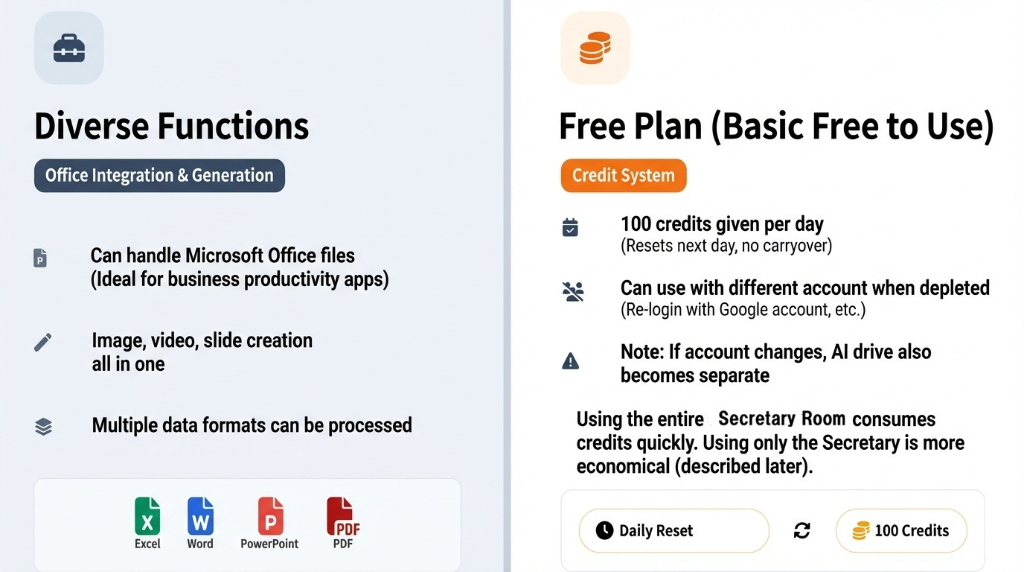
Genspark's diverse features and free plan
4-1. Business Document Creation Features
Automatically create presentation materials and meeting documents by simply giving instructions.
- Slide Creation: Generate presentation materials in HTML/PowerPoint format
- Meeting Minute Creation: Organize meeting content and automatically generate minutes
- Report Creation: Automatically generate reports based on data
- Proposal Creation: Organize proposal content and create proposal documents
4-2. Creative Features
Generate images, videos, and design assets using only text instructions.
- Image Generation: Generate images from text (product images, banners, illustrations, etc.)
- Video Generation: Generate short videos from text (promotional, explanatory videos, etc.)
- Design Asset Creation: Generate logos, icons, background images, etc.
4-3. Office Integration and File Management Features
You can read, edit, and generate Microsoft Office files.
- Excel: Data analysis, graph creation, automatic function generation
- Word: Document creation, template generation, formatting
- PowerPoint: Presentation material creation, slide design
- PDF: PDF reading, editing, conversion
- AI Drive: Permanently save files in cloud storage
4-4. Other Advanced Features
It also includes advanced features such as program development.
- Program Development: Code generation, testing, and execution for Python, JavaScript, TypeScript, etc.
- Web App Creation: Capable of creating simple web applications
- Data Analysis: Data aggregation, analysis, and visualization
*The program development feature is for advanced uses. Business professionals are recommended to start by trying basic features such as slide creation and image generation.
5. Free Plan and Pricing Structure
5-1. Free Plan (Basically Free to Use)
The Genspark free plan grants 100 credits per day.
- Credit System: 100 credits granted daily
- Resets Daily: Even if you use them all, 100 credits are restored the next day
- No Rollover: Unused credits expire
- Can be Used with Different Accounts: If credits run out, log in with a different account
⚠️ Caution: Impact of Account Switching
If you log in with a different account, the AI Drive will also be separate. For continuous use, it is recommended to keep using the same account.
5-2. Tips for Saving Credits
To use the free plan for a long time, you need to devise ways to reduce credit consumption.
💡 Credit-Saving Technique: Differentiating "Secretary" and "Secretary's Office"
Secretary's Office (Super Chat): High credit consumption
- Give instructions to the Super Chat on the top page
- Slide creation, image generation, video creation, program execution, etc.
- Uses Sandbox, AI Drive
- Engine is Claude only
Secretary (AI Chat): Low credit consumption
- AI Chat at the bottom of the top page
- Conceptualization, consultation, research
- Simple text creation, idea generation
- ChatGPT, Gemini also available in addition to Claude
→ By doing conceptualization and research with the "Secretary (AI Chat)" and only using the "Secretary's Office (Super Chat)" for actual slide creation and image generation, you can use credits efficiently.
6. Two Working Environments: Sandbox and AI Drive
Genspark has two working environments: Sandbox and AI Drive.
In simple terms:
- Sandbox = AI agent's dedicated computer (for work)
- AI Drive = Cloud file server (for storage)
| Item | Sandbox | AI Drive |
|---|---|---|
| Purpose | Temporary workspace | Permanent storage location |
| Environment | AI agent's dedicated computer | Cloud file server |
| Data Retention | Deleted in a few hours | Permanently saved |
| Access | AI only (user needs to request) | Both user and AI can freely access |
| Analogy | Working desk | Document storage cabinet |
⚠️ Important: Files in the Sandbox will disappear!
Files in the Sandbox will be deleted in a few hours! Please be sure to save important files (completed slides, images, documents, etc.) to the AI Drive.
Examples of How to Use Them
- Sandbox: Working files during slide creation, temporary files for image generation
- AI Drive: Saving completed slides, images, documents
7. How the AI Agent System Works
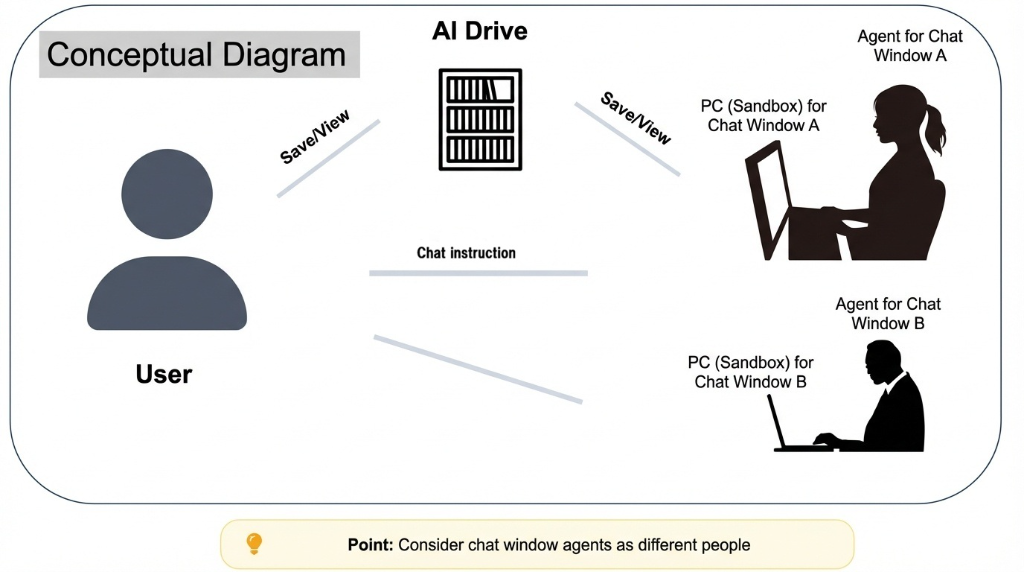
Relationship between User, AI Agent, and AI Drive
Features of AI Agents
In Genspark, when you switch chat screens, a different AI agent (secretary) takes over.
⚠️ Important: Switching chat screens treats you as a different person
Content discussed in chat screen A is not conveyed to the agent in chat screen B.
If you want to continue working, either keep using the same chat screen
or save important information to AI Drive for handover.
8. Let's Try It Out
Here's a simple guide for first-time users.
Step 1: Access Genspark
Access Genspark from the official website (https://www.genspark.ai/).
Step 2: Log In
Log in using your Google account or similar.
Step 3: Try Your First Task
Enter the following prompt examples into the chat screen to try out Genspark's features.
💡 First Prompt Examples
① Try Slide Creation
Please create a 5-page presentation document on the theme "Fundamentals of AI Utilization".
② Try Image Generation
Please create a fresh blue sky and lush green background image that can be used in a business setting.
③ Try Meeting Minute Creation
Please summarize the following meeting content into minutes:
[Paste meeting content here]
④ Ask a Simple Question (Credit Saving)
Please suggest 5 taglines for a new product.
*For simple questions like ④, using the "AI Chat" at the bottom will save credits.
Step 4: Check the Output
Open AI Drive and check the generated files.
Step 5: Download Files
Download the completed slides and images from AI Drive and utilize them in your actual business.
9. Conclusion
In this article, we explained Genspark, which made its full-scale entry into the Japanese market in 2026, in an easy-to-understand way for ChatGPT users.
Genspark Features (Review)
- ✅ Multifunctional AI business tool (not just a chat AI)
- ✅ Completes tasks with just instructions (slide creation, image generation, video creation, meeting minute creation)
- ✅ Free plan (100 credits per day)
- ✅ AI Drive (permanent file storage)
- ✅ Office integration (Excel, Word, PowerPoint, PDF)
Message to ChatGPT Users
If you are proficient with ChatGPT, you will surely quickly understand Genspark's potential.
✅ How to use ChatGPT and Genspark effectively
- ChatGPT: Daily questions, text creation, idea generation, simple consultations
- Genspark: Presentation material creation, image/video generation, meeting minute creation, Office integration
→ It is effective to differentiate their use: ChatGPT for "conversation/text" and Genspark for "business document creation."
Start by trying the free plan (100 credits per day).
📚 Related Articles
- 【Thorough Comparison】Genspark vs ChatGPT vs Cursor: The Only Reason to Choose "Genspark" for AI Development
- Complete Guide to Genspark Basic Features: 9 Tools for AI Search, Research, and Content Creation
- Complete Guide to Genspark Advanced Features: 11 Tools for Creative, Development, and Real-World Tasks
- Genspark Development Procedure: A Practical Guide from Concept to Operation
- Genspark vs ChatGPT vs Claude: 3 AI Differences Revealed in Practical Comparison