Table of Contents
- 1. Introduction
- 2. The Decisive Difference Between Free and Paid Plans
- 3. Genspark's Basic Pricing Plans and Prices
- 4. Personal Opinion: The $19.99 Plan is Fine to Start With
- 5. Practical Techniques: Smart Ways to Reduce Credit Consumption
- 6. Your Dedicated AI Employee! What is the Additional Feature "Claw"?
- 7. Summary
1. Introduction
An AI platform, "Genspark," capable of handling a wide range of tasks from search to image generation, programming, and slide creation.
Many of you are probably wondering, "How much can I use for free?" and "Which pricing plan should I choose to avoid losing out?"
In this article, we will thoroughly explain the decisive differences between the free and paid versions, the details of the basic pricing plans, and the much-talked-about autonomous AI assistant "Claw." We will also introduce the plan I personally use and practical techniques to reduce credit consumption.
2. The Decisive Difference Between Free and Paid Plans
First, let's understand "why you need a paid plan."
While Genspark allows you to experience some powerful features even in the free version, you'll encounter a significant hurdle when trying to use it seriously for business. The prime example is the "output restriction to PowerPoint (PPTX) files in the slide generation feature."
A major appeal of Genspark is that the AI automatically creates beautiful slide materials just by giving it a theme, but with the free version, you cannot download the completed slides in PowerPoint format (.pptx).
PowerPoint output is essential for fine-tuning and sharing documents with your team in business. If you want to fully utilize this feature, you will need to upgrade to a paid plan.
3. Genspark's Basic Pricing Plans and Prices
Genspark's basic plans offer mainly three grades, depending on the amount of credits (points for performing advanced AI processing) granted monthly. Please check the official Genspark pricing page for details.
| Plan Name | Monthly Equivalent (Annual Payment) | Monthly Credits | Key Features |
|---|---|---|---|
| Plan 1 (Recommended) | $19.99 | 10,000 | Unlimited use of top models, PowerPoint output feature |
| Plan 2 | $39.99〜 | 21,000〜 (Adjustable) | Same features as $19.99 plan (credit increase only) |
| Plan 3 | $199.99 | 125,000 | In addition to the above, unlocks Pro-exclusive models (Nano banana Pro/2 4K, etc.) |
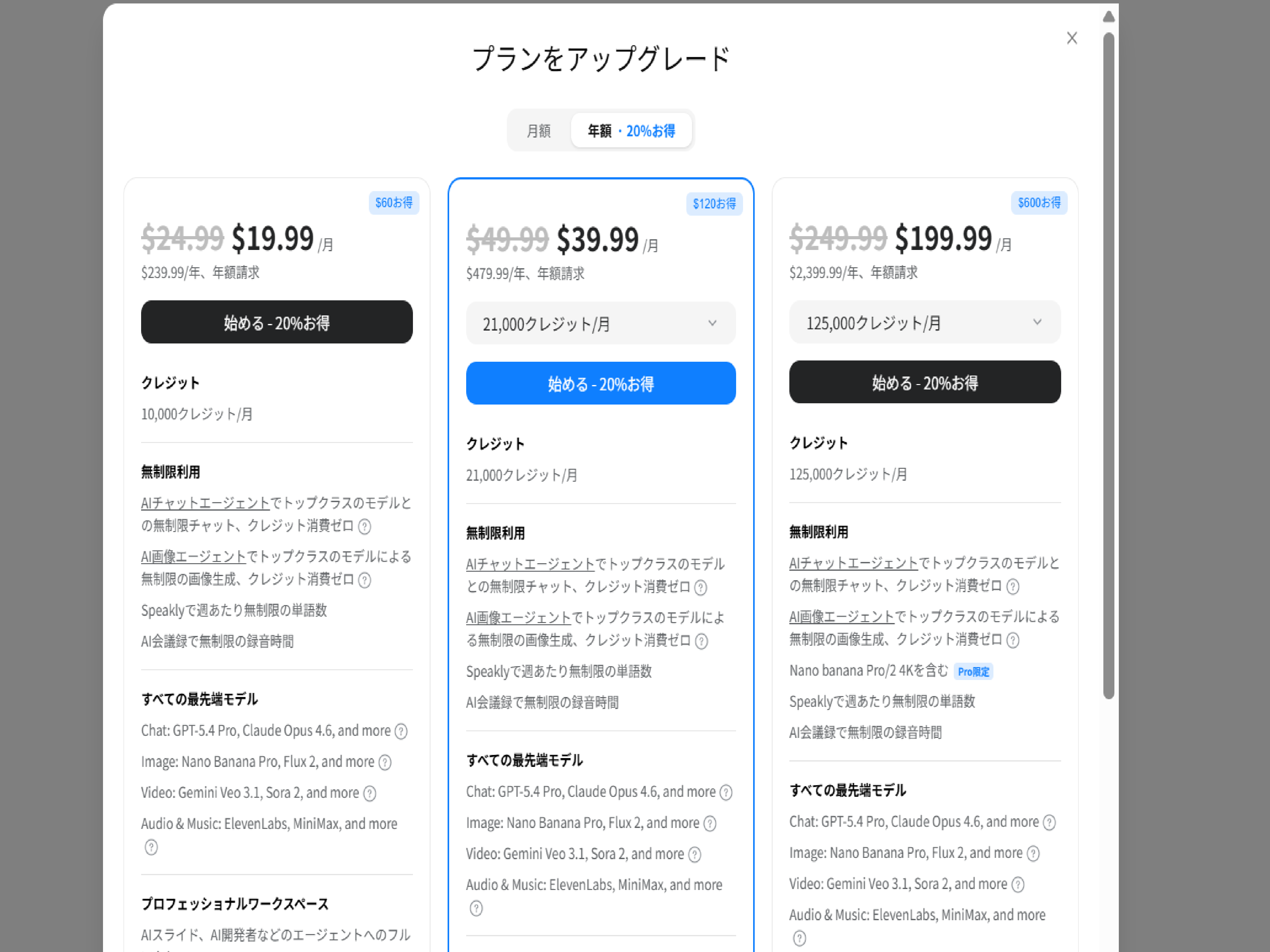
The prices listed in the table (e.g., $19.99) are monthly equivalents when you select "annual lump-sum payment." For the $19.99 plan, an initial lump-sum payment for the year ($239.99) will be incurred. If you choose monthly payment, it will be "$24.99 per month," so please check the display on the payment screen carefully.
To summarize the features of each plan:
- Plan 1: The basic plan ideal for daily research and document creation
- Plan 2: Comes with an option to fine-tune credit count between 21,000 and 95,000
- Plan 3: The top-tier plan for heavy users and professional creators
No matter which basic plan you choose, "AI Chat" and "AI Image Generation" features using top-tier text models like GPT-4o and Claude Opus 4.6 are available for unlimited use with zero credit consumption. Unlimited words per week with Speakly and unlimited AI meeting recording time are also included in all plans.
Please check the official Genspark pricing page for the latest pricing details.
4. Personal Opinion: The $19.99 Plan is Fine to Start With
As my personal opinion, having extensively used Genspark, I strongly recommend the cheapest "$19.99/month plan (10,000 credits)" for those who are about to subscribe.
The reason is simple: there is absolutely no functional difference between the $19.99 plan and the $39.99 plan. It's purely about the amount of credits granted each month.
Start with the $19.99 plan (monthly or annual payment as you prefer), and if you run out of credits mid-month, purchase additional credits or upgrade then. This approach is the most efficient.
Previous articles also explain the differences between the free and paid versions in detail. Please refer to them.
→ Genspark Free vs. Paid Version: A Detailed Comparison
→ How to Get Free Credits with Genspark
5. Practical Techniques: Smart Ways to Reduce Credit Consumption
The concern "Are 10,000 credits really enough?" can be resolved by differentiating your usage of features.
Genspark has "Super Chat" on the top page and "AI Chat" which allows you to switch between different models.
- Super Chat: Integrates and automatically executes multiple tools in the background for tasks like complete slide creation or complex program execution, thus consuming more credits per use (approx. 24 credits/use)
- AI Chat: Uses a single model for tasks like general research or brainstorming text, thus consuming very few credits (approx. 2-9 credits, or unlimited use for some)
For everyday research and writing, use "AI Chat," and only use "Super Chat" for complex tasks (like slide creation) when it's absolutely necessary. Mastering this distinction will allow you to manage well even with the $19.99 plan.
For detailed usage distinctions and differences in credit consumption, please refer to the following articles.
→ How to Use Genspark and a Trick to Create PowerPoints for Free
→ How to Use a Multi-functional AI Tool You'll Want to Try After ChatGPT
6. Your Dedicated AI Employee! What is the Additional Feature "Claw"?
In addition to its basic AI tool functionalities, a new AI service currently drawing significant attention is "Genspark Claw."
It's not just a chat AI, but a personal assistant feature that operates autonomously as "your first AI employee." Currently, you can get it for a limited-time promotional price starting from $9.99/month (up to 75% off, with up to 10,000 bonus credits included). You can cancel anytime.
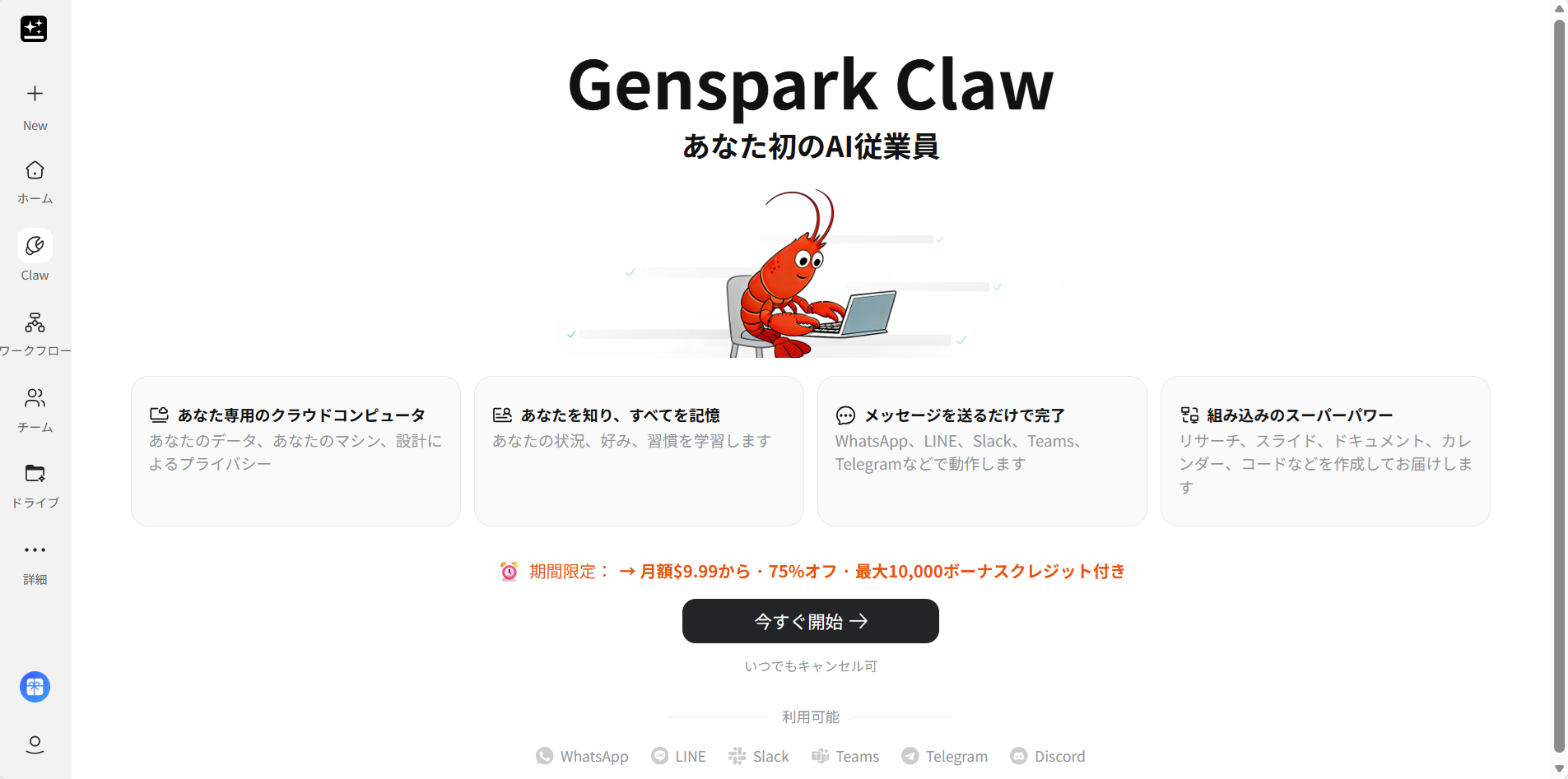
Key Features of Claw
- Knows You, Remembers Everything: Learns user preferences, work situation, and habits, functioning as your dedicated cloud computer.
- Give Instructions via Familiar Apps: You can request tasks in natural language from messaging apps like WhatsApp, LINE, Slack, Teams, and Telegram.
- Built-in Superpowers: You can completely offload tasks, from research to slide creation, document writing, and calendar management, just as you would instruct a human employee.
If you want to "completely offload tasks to AI and significantly increase your free time," consider utilizing Claw, which can be adopted starting from $9.99/month. A separate subscription from Genspark's basic plans is required.
7. Summary
To unlock Genspark's true power (especially PowerPoint output), a paid plan subscription is essential. However, when getting started, opting for the "$19.99/month plan," which has no functional difference, is the most cost-effective choice.
Just be careful when choosing between "annual lump-sum payment" and "monthly payment" during checkout. By habitually saving credits with AI Chat and purchasing more when needed, you can sufficiently manage your usage.
Furthermore, if you want to "completely offload tasks to AI," also consider utilizing the AI employee "Claw."
Please check the official pricing page for pricing details.
Related Articles
- Genspark Free vs. Paid Version: A Detailed Comparison [With Invite Code · Latest as of February 2026]
- [Up to 1500 Added] How to Get Free Credits with Genspark
- How to Use Genspark? A Trick to Create PowerPoints for Free and Credit-Saving Tips
- [Time-Saving Technique] 3 Steps to Rapidly Create PowerPoint Documents with Genspark! Free Version Trick Also Revealed